Amazon QuickSight – Dashboard Emails
Amazon QuickSight is a business intelligence and data visualization service provided by Amazon Web Services (AWS). It allows users to create interactive dashboards and reports from various data sources and share them with others.
Regarding dashboard emails, QuickSight supports scheduling and delivering reports and dashboards via email. You can set up automatic email delivery for a dashboard to ensure that your stakeholders receive the latest data on a regular basis. The email can include a PDF attachment of the dashboard or a link to the live dashboard in QuickSight.
To set up dashboard emails in QuickSight, you will need to use the “Publish to Email” feature, which is available in the QuickSight console. You can select the dashboard you want to share, specify the recipient email addresses, and choose the frequency of the email delivery.
Note that QuickSight offers different subscription plans that might affect the available features and capabilities of the service, including the number of email recipients and the frequency of email deliveries.
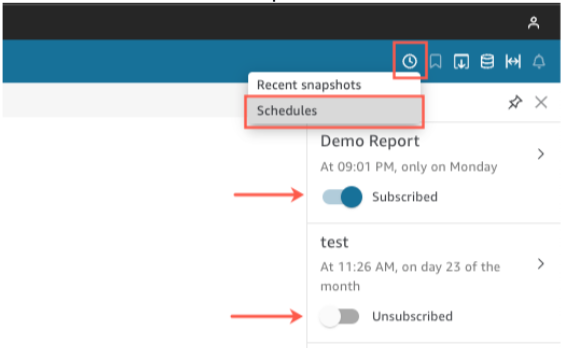
To change subscription and report settings for a dashboard
- Open a dashboard that is shared with you.
- Select Schedules from the Schedules icon at the upper right in the dropdown menu.
- On the right, you will find the Schedules pane. This pane shows you all the scheduled reports you are subscribed to or can subscribe to. Select the report you want and toggle the switch to subscribe or unsubscribe.