
Fast-forward Merge
A fast-forward merge is a type of merge in Git that occurs when the current branch is up-to-date with the branch being merged, and Git can simply move the branch pointer to the latest commit in the merged branch. In other words, the branch being merged is a direct ancestor of the current branch.
A two-way merge is a process of combining the changes made to two separate versions of a file, database, or code repository into a single, unified version. This process is commonly used in version control systems such as Git, SVN, and others.
Here’s a step-by-step explanation of the two-way merge process:
Identifying the base version: The first step is to identify the common base version from which both the separate versions were derived. This is often the latest version of the file before either of the two changes were made.
Determining the differences: Next, the changes made to each of the two separate versions are compared to the base version to determine the differences.
Resolving conflicts: If there are conflicts between the two changes (e.g., both versions made changes to the same line of code), they need to be resolved before the merge can be completed. This may involve choosing one version of the change, manually editing the code, or finding an alternative solution that satisfies both changes.
Combining changes: Once all conflicts have been resolved, the changes made to each version can be combined into a single, unified version.
Finalizing the merge: Finally, the merge is finalized and the combined version is saved as the latest version of the file.
It’s important to note that the two-way merge process can become more complex when dealing with a large number of changes and conflicts. In such cases, tools such as merge conflict editors can be used to help resolve conflicts and simplify the merge process.
Let’s take an example, we have a file sky in the a branch named ‘india’ and we need to merge it to the target branch ‘master’.
1.We need to push that created file to the commit.
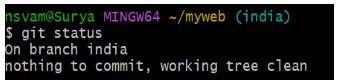
2.Now, we need to checkout to the target branch (master) and merge the india branch to the master branch there. Following the below command:
$ git merge <branch-name>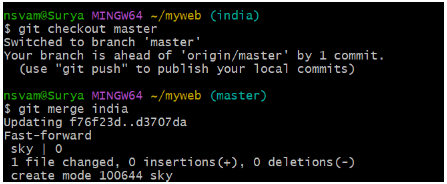
Now, we can see the file created has been merged in the master branch and ready to push.
3.Now, we can push the merged file to the remote repo.

Now, the merged file has been pushed to the repo and the merge has been done in the fast-forward method.
- Fast-forward merges are the simplest form of merging in Git, and they are often used when merging a feature branch back into the main branch or when updating a local branch with changes from a remote branch. However, fast-forward merges are not always possible, and in those cases, Git will perform a more complex merge, such as a recursive merge.