
Git log
The git log command is used to display the commit history of a Git repository. It provides a comprehensive list of all the commits made to the repository, including the author, date, and commit message for each commit.
The basic syntax of the git log command is:
$ git log 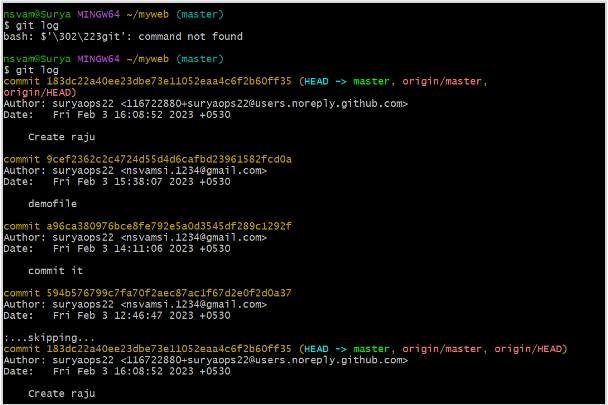
Git log shows all the logs, i.e the commit history of the git repository.
By default, git log displays a list of the most recent commits, starting with the newest. Each commit is displayed in a separate block of information, with the commit hash, author, date, and commit message.
Here are some common options used with the git log command:
- –pretty : This option allows you to format the output of the git log command. For example,–pretty=oneline will display each commit on a single line, showing only the first 7 characters of the commit hash, the author, and the commit message.

As shown above the below command shows the logs in one just simple line.
git log –pretty=oneline- –author : This option allows you to filter the git log output to only show commits by a specific author. For example, the below command will display only the commits that were authored by Surya.
git log –author=”surya”
As shown above the the below command shows logs output only made by author Surya.
git log –author=”surya”- –since and –until : These options allow you to filter the git log output by date. For example, the below command will display only the commits that were made between January 1st, 2023 and December 31st, 2023.
git log --since=”2023-01-01” --until=”2023-12-31”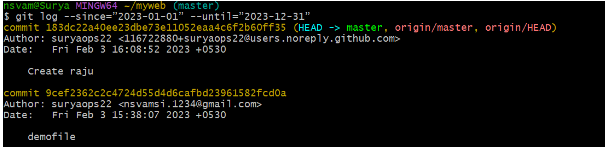
As shown above the git log –since=”2023-01-01” –until=”2023-12-31” , shows logs output only made between January 1st, 2023 and December 31st, 2023.
-p: This option displays the changes made in each commit, in addition to the commit information.
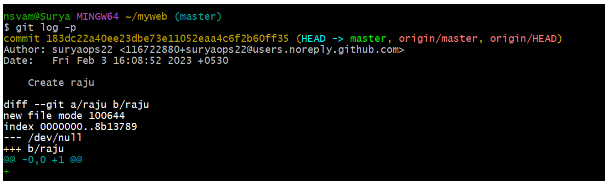
As shown above the below command shows the changes made in each commit.
git log -p–stat : This option displays a summary of the changes made in each commit, including the number of files changed and the number of lines added or deleted.

As shown above the below command shows the summary of the changes made.
git log --statThese are just a few of the options available for the git log command. By combining these options, you can customize the output of git log to meet your specific needs and requirements.