
Recursive/Two-way/ort Merge
A two-way merge is a process of combining the changes made to two separate versions of a file, database, or code repository into a single, unified version. This process is commonly used in version control systems such as Git, SVN, and others.
Here’s a step-by-step explanation of the two-way merge process:
Identifying the base version: The first step is to identify the common base version from which both the separate versions were derived. This is often the latest version of the file before either of the two changes were made.
Determining the differences: Next, the changes made to each of the two separate versions are compared to the base version to determine the differences.
Resolving conflicts: If there are conflicts between the two changes (e.g., both versions made changes to the same line of code), they need to be resolved before the merge can be completed. This may involve choosing one version of the change, manually editing the code, or finding an alternative solution that satisfies both changes.
Combining changes: Once all conflicts have been resolved, the changes made to each version can be combined into a single, unified version.
Finalizing the merge: Finally, the merge is finalized and the combined version is saved as the latest version of the file.
It’s important to note that the two-way merge process can become more complex when dealing with a large number of changes and conflicts. In such cases, tools such as merge conflict editors can be used to help resolve conflicts and simplify the merge process.
The following process shows recursive merge process works :
1.Let’s think we have a file named ‘newfile3’ in the branch ‘dev1’ and we have to merge it to the branch ‘master’ and even the ‘master’ branch have a file which is committed and not yet pushed yet.
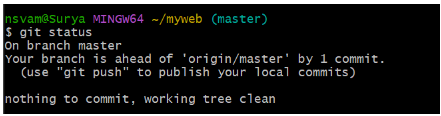
As we can see , in master branch the file is ready to push.
2.Now we need to checkout to the master branch and there we have to merge the dev1 file by using the following command.
$ git merge <branch-name>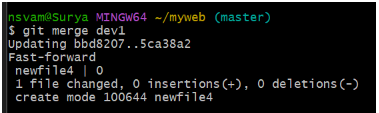
As we can see the dev1 has been merged into the master and ready to push.

Now, the both files from the master and dev1 has been pushed to the remote.
This type of two-way merge process of combines the changes made to two separate versions of a file, database, or code repository into a single, unified version.