

Power BI – Azure Data Sources
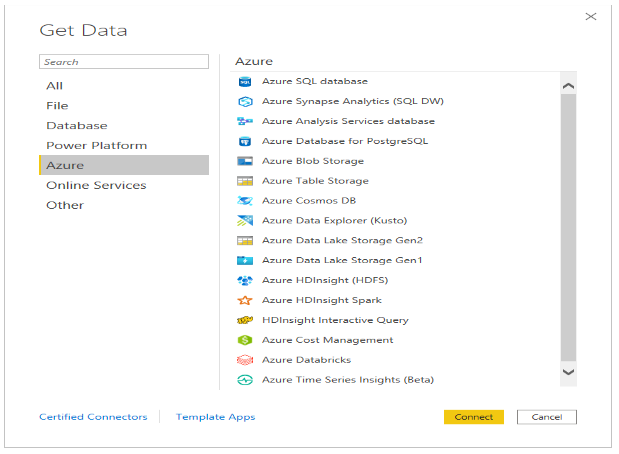
Power BI is a business intelligence tool developed by Microsoft that allows users to analyze data and create interactive reports and visualizations. Azure is Microsoft’s cloud computing platform that offers a wide range of services for data storage, processing, and analysis. Power BI integrates with Azure to provide users with access to various data sources that can be used to create reports and dashboards.. The Azure category provides the following data connections:
- Azure SQL Database
- Azure Synapse Analytics SQL
- Azure Analysis Services database
- Azure Database for PostgreSQL
- Azure Blob Storage
- Azure Table Storage
- Azure Cosmos DB v1
- Azure Data Explorer (Kusto)
- Azure Data Lake Storage Gen2
- Azure Data Lake Storage Gen1
- Azure HDInsight (HDFS)
- Azure HDInsight Spark
- HDInsight Interactive Query
- Azure Cost Management
- Azure Databricks
- Azure Synapse Analytics workspace (Beta)
- Azure Time Series Insights (Beta)
Here is a brief explanation of some of the Azure Data Sources:
Azure SQL Database: Azure SQL Database is a fully managed relational database service that allows users to create and manage SQL Server databases in the cloud. Power BI can connect to Azure SQL Database to access data stored in the database and create reports and visualizations.
Azure Synapse Analytics SQL: Azure Synapse Analytics SQL (formerly known as Azure SQL Data Warehouse) is a cloud-based analytics service that allows users to analyze large amounts of data using SQL queries. Power BI can connect to Azure Synapse Analytics SQL to access data stored in the service and create reports and visualizations.
Azure Blob Storage: Azure Blob Storage is a cloud-based object storage service that allows users to store and access large amounts of unstructured data, such as text and binary data. Power BI can connect to Azure Blob Storage to access data stored in the service and create reports and visualizations.
Azure Data Lake Storage Gen2: Azure Data Lake Storage Gen2 is a cloud-based data storage and analytics service that allows users to store and analyze large amounts of data in a distributed and scalable manner. Power BI can connect to Azure Data Lake Storage Gen2 to access data stored in the service and create reports and visualizations.
Azure Data Lake Storage Gen1: Azure Data Lake Storage Gen1 is a cloud-based data storage and analytics service that allows users to store and analyze large amounts of data in a distributed and scalable manner. Power BI can connect to Azure Data Lake Storage Gen1 to access data stored in the service and create reports and visualizations.
Azure Databricks: Azure Databricks is a fast, easy, and collaborative Apache Spark-based analytics platform that allows users to build data pipelines, run machine learning models, and perform advanced analytics. Power BI can connect to Azure Databricks to access data stored in the service and create reports and visualizations.
The following image shows the Get Data window for Azure.

In summary, Power BI can connect to various Azure data sources to access and analyze data stored in the cloud. These data sources include Azure SQL Database, Azure Synapse Analytics SQL, Azure Blob Storage, Azure Data Lake Storage Gen2, Azure Data Lake Storage Gen1, and Azure Databricks. By connecting to these data sources, Power BI provides users with a comprehensive platform to analyze and visualize their data.