Power BI – Republish / Replace Datasets
Republish or replace a dataset published from Power BI Desktop
The dataset, and any reports you created in Power BI Desktop, upload to your Power BI site when you publish a Power BI Desktop file. Republishing your Power BI Desktop file replaces the dataset in your Power BI site with the updated dataset.
This process is straightforward, but you should know the following:
- If you have two or more datasets in Power BI with the same name as your Power BI Desktop file, the publishing process may fail. It is important to ensure that you only have one dataset in Power BI with the same name. Alternatively, you can rename the file and publish it, creating a new dataset with the same name as the file.
- If you rename or delete a column or measure, any visualizations that use that field in Power BI may no longer work.
- Some changes to the format of existing columns in Power BI may be ignored. For instance, if you change a column’s format from 0.25% to 25%.
- If you add new data sources to your file and then republish it with a refresh schedule configured for the existing dataset in Power BI, you will need to sign into them before the next scheduled refresh.
- When you republish a dataset previously published from Power BI Desktop with a refresh schedule defined, a dataset refresh will automatically start.
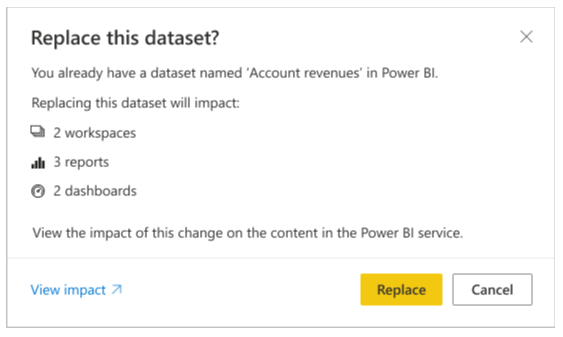
- After making changes to a dataset and republishing it, a message will indicate how many workspaces, reports, and dashboards may be impacted by the change. The message will prompt you to confirm if you want to replace the currently published dataset with the modified one. Additionally, the message provides a link to the full dataset impact analysis in the Power BI service where you can obtain more information and take steps to mitigate the risks of your changes.
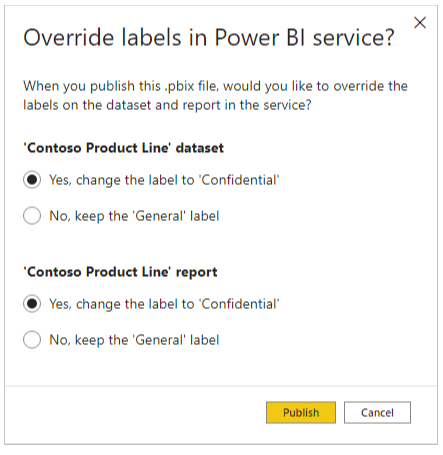
- IIf the dataset (and, if applicable, the report) in the Power BI service that you intend to overwrite has sensitivity labels that are not consistent with the label in your .pbix file, a dialog box will appear. This dialog box will ask you to choose between keeping the current labels or replacing them with the labels from your .pbix file.